
Installation and Configuration
WebService connection test
The Web Service Mondial Relay – InPost page allows you to verify that the identifiers entered in the Account tab (and, if necessary, the seller information) are correct and that your site can successfully reach the Mondial Relay – InPost services.
Access the test page
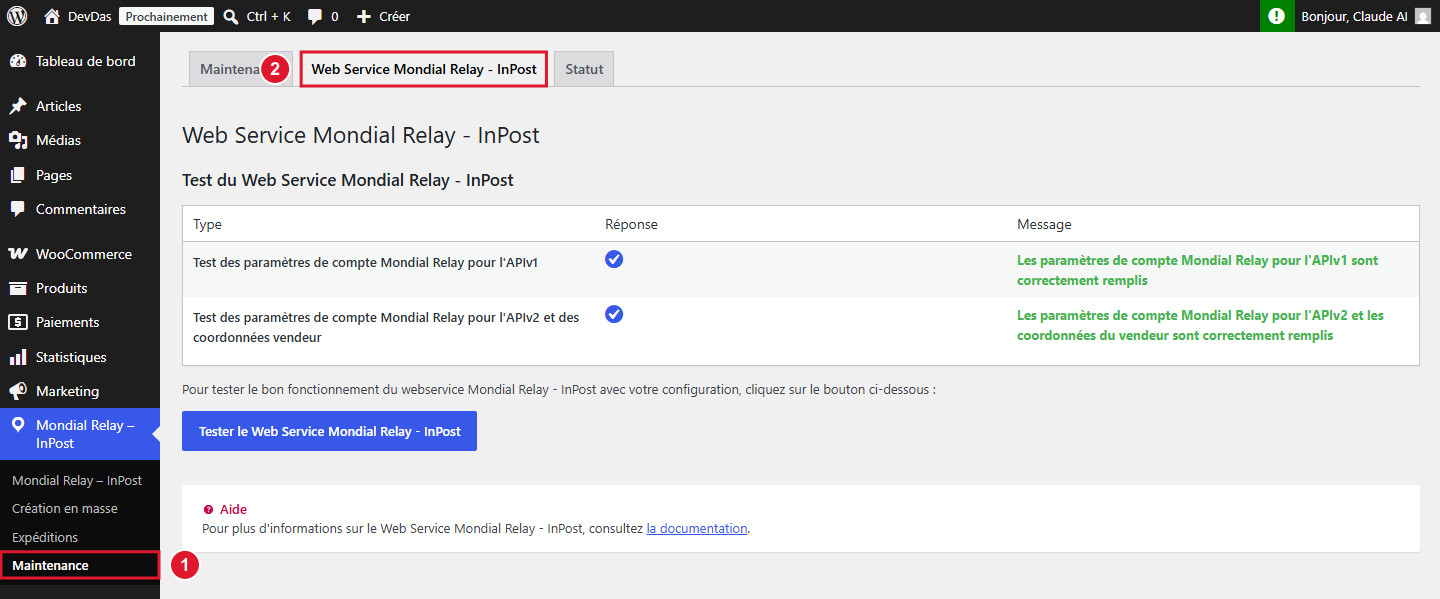
From your WordPress back-office, hover over the Mondial Relay – InPost menu in the left column then click on the Maintenance submenu (1), then on the Web Service Mondial Relay – InPost tab (2).
Run the test
Click on the Test Web Service Mondial Relay – InPost button. Two checks are performed:
- Test of Mondial Relay account parameters for APIv1: verifies that the Store Name, Brand Code and Private Key (Account tab) allow you to reach the Relay Points® search Web Service;
- Test of Mondial Relay account parameters for APIv2 and seller information: verifies, according to your configuration, seller information alone or API v2 identifiers with seller information.
A green checkmark ✔ and a green message confirm that the test was successful. In case of error, a red message indicates the return code and its meaning: refer to this message to correct the relevant field (most often in the Account tab or Seller tab).
If you enable Debug Mode in the Maintenance tab, an additional Parameters column displays the technical details of the calls sent to Mondial Relay – InPost: to be provided to our support if needed, but never to be shared publicly as it contains your identifiers.