
Installation and Configuration
Setting up home delivery in France
Mondial Relay – InPost has opened home delivery in France. To take advantage of it, you must have the plugin in a version equal to or greater than version 5.1.
To set it up on your site, you have two actions to perform: one in your online Connect space to activate this option at the level of your professional contract and one in your site’s backoffice to enter the dedicated credentials. Once these actions are completed, you will be able to add a shipping method dedicated to this new delivery mode.
Warning: these actions are essential for service activation. They will allow you to have a label dedicated to home delivery in France containing a double barcode.
1. Activation of the option in your Connect space
To perform this activation, you must go to your online Connect space (you must use the same credentials as those used to log in to My Profile): https://connect.mondialrelay.com
You must then go to the “Administration” menu, “API Configuration” submenu:

On this page, you can select the v2 API and activate it:

Once this option is activated, you will have access to the credentials that will allow you to activate home delivery in the plugin, namely “API Login” and “API Password”:

2. Entry of credentials in the plugin
To activate home delivery in France in the plugin, you must go to the “Mondial Relay – InPost” menu, “Mondial Relay – InPost” submenu, “Account” tab:

You must enter the information for the v2 API on this page, namely the “API Login” and “API Password” data.
You do not need to modify the information located above (Store Code, Brand Code and Private Key) concerning the v1 API. This information should also be preserved as it is necessary for displaying the relay point and locker selection map during checkout.
3. Secure home delivery (optional)
If your account is not a CC brand account and your shipping method covers France, a Home Delivery Security (France) field appears in the shipping method settings, under the Mondial Relay – InPost Delivery Mode set to Home delivery – HOM:
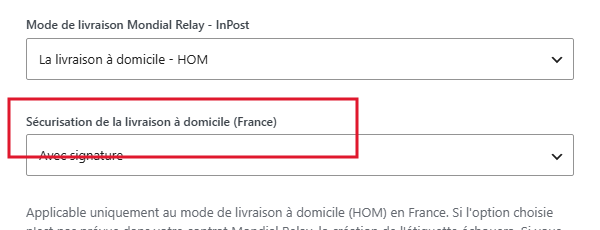
Three choices are possible: No option, With signature (a signature from the recipient is required at delivery) or With Pin Code (a code sent to the recipient must be provided to the delivery person). Check with your Mondial Relay – InPost contract that the selected option is indeed provided for: otherwise, label creation will fail.
If you want to offer multiple of these options to your customers, create one shipping method per option and name them distinctly, for example “HOM France no option”, “HOM France with signature”, “HOM France with Pin Code”.
Once this information is saved, your site is ready to offer home delivery in France. To do this, you must create a dedicated shipping method in your geographic area for France and select the HOM delivery mode. You can refer to the dedicated documentation by clicking here.